Install the software from the manufacturer's website: quantexlab.com/en/download.html
(according to the type and bit depth of the operating system).
ScanDoc for Android (minimum version 6) can be downloaded from the official Google Play store.

The ScanDoc program for iOs (minimum version 10) can be downloaded from the official App Store.

Launch the new ScanDoc software on your computer or mobile device using the desktop shortcut.
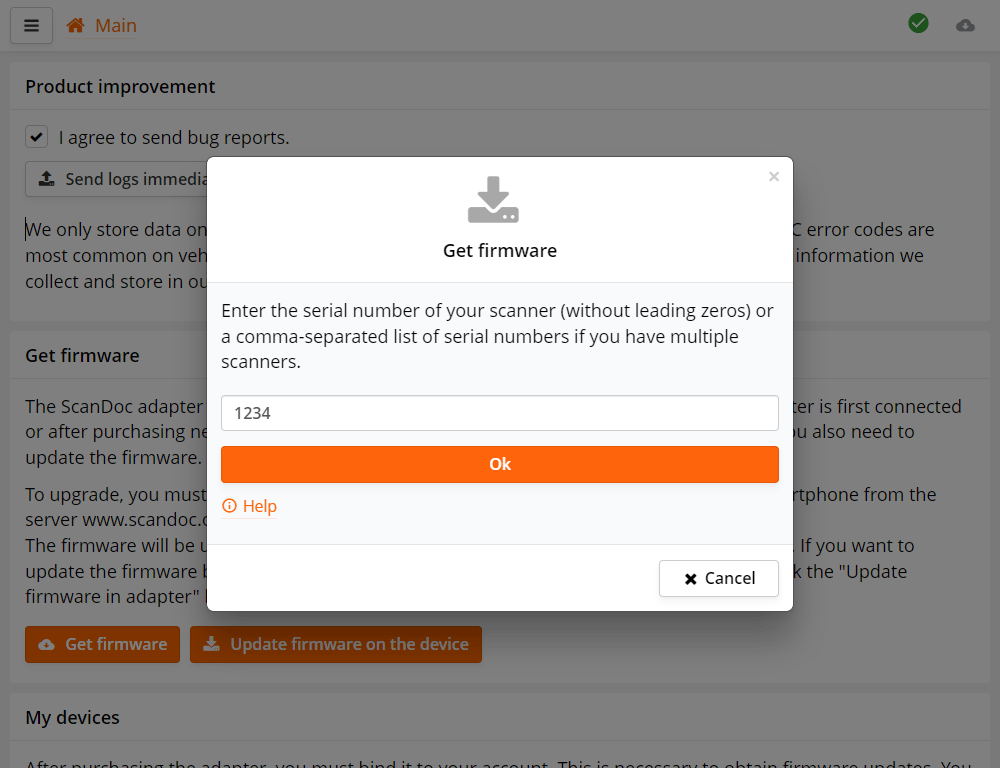
When you first launch the program, a form for entering serial numbers will appear. Enter your scanner's serial number.
If you have multiple scanners, enter their serial numbers separated by commas, for example: 25478, 1230.
The program will then automatically download the firmware files and the vehicle make files from the internet for your scanner.
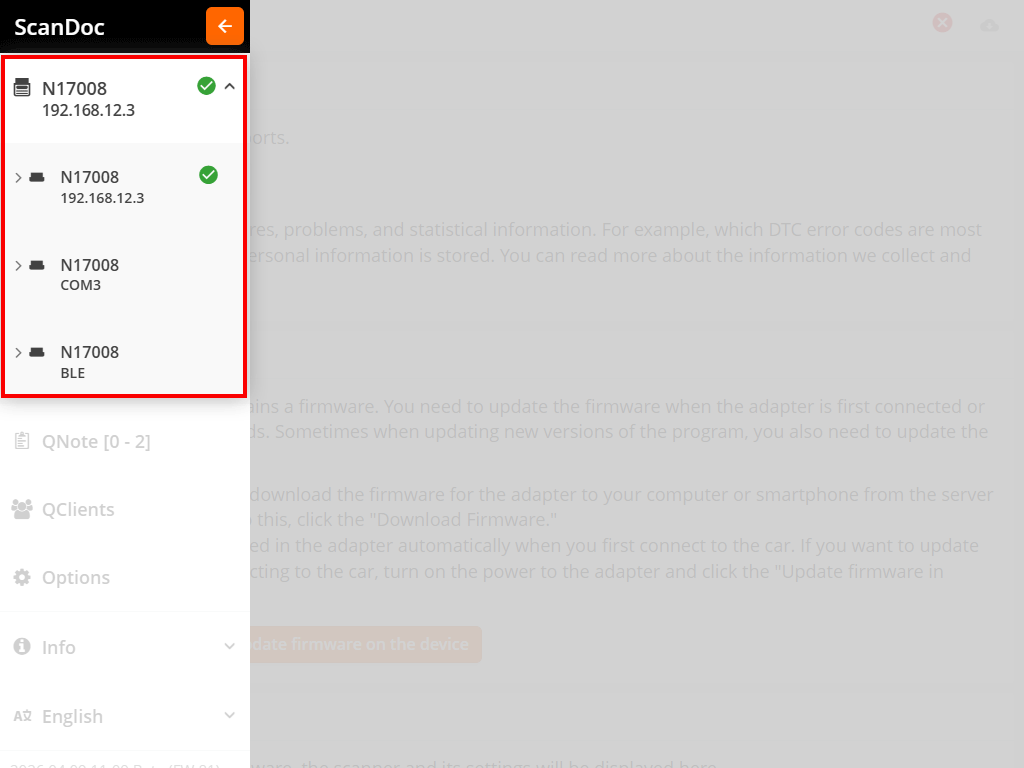
In the program, click the button at the top of the window, an additional side menu will appear.
Select the communication channel you want to use to connect to the interface. The selected channel will be shown at the top of the menu.
On a computer, three communication channels are available: WLAN, BLE and USB. On mobile devices, only WLAN and BLE are available.
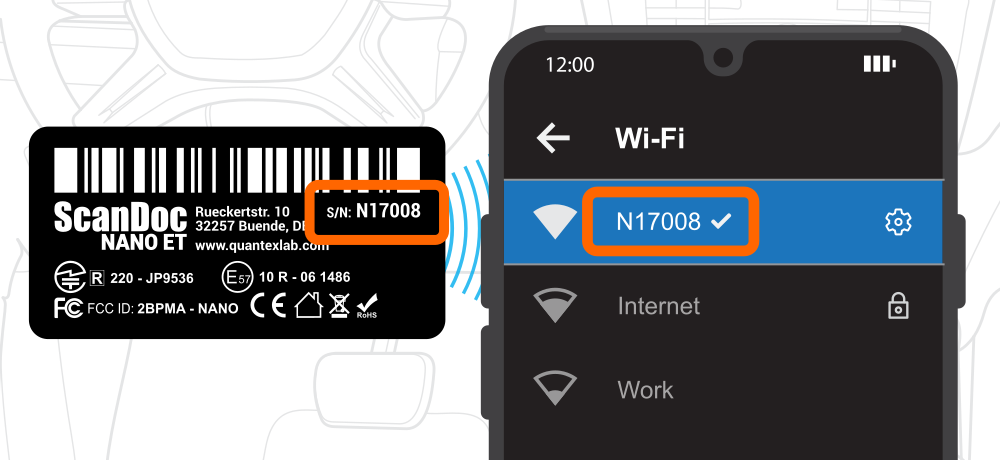
On your computer or smartphone, open the list of available WLAN networks and connect to your interface's network.
The network name matches the scanner's serial number, and the password is the word scandoc followed by the serial number without the letter.
For example, if your scanner has serial number s/n: N17008, the network will be named N17008, and the password will be scandoc17008.
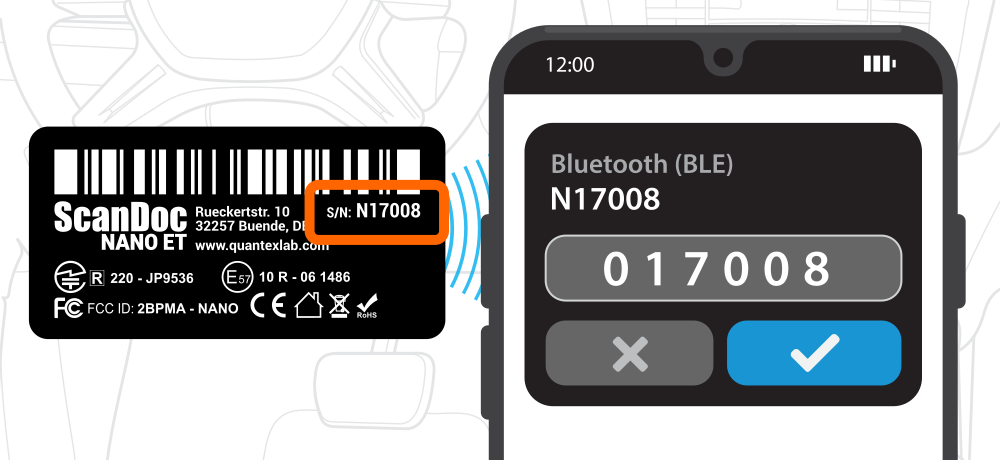
BLE pairing happens during the first connection to the device. During step 4, when updating the firmware, select the BLE connection. After a few seconds, a window will appear on the screen asking for the pairing password - the password must be entered in that window.
The password (PIN code) is the scanner serial number, where instead of the letter N you need to write 0.
For example, if your scanner has serial number s/n: N17008, the password will be 017008.
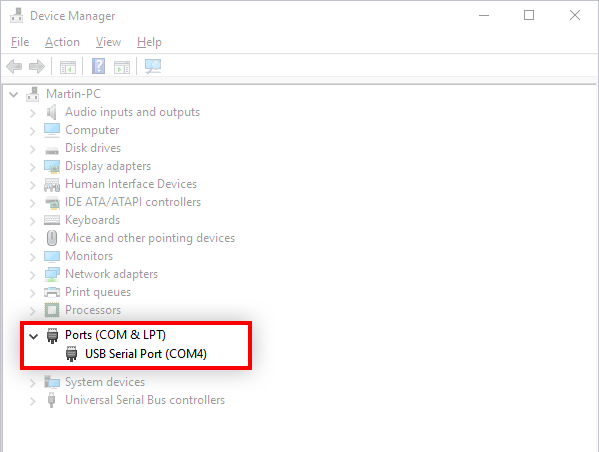
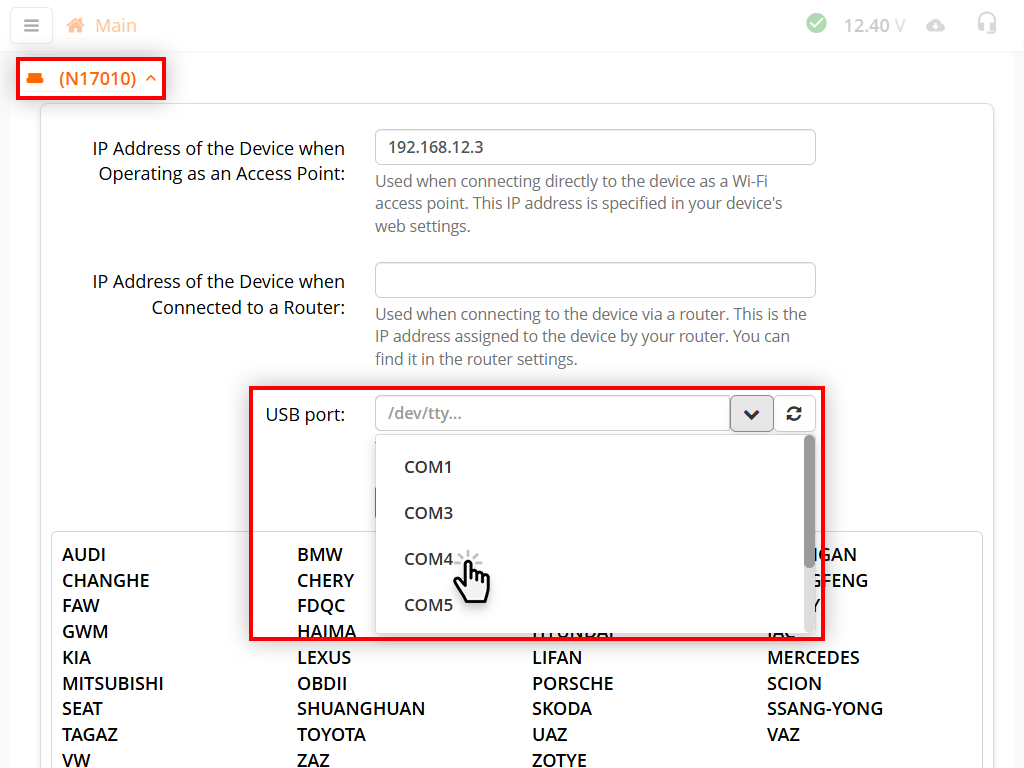
Connect the interface to your computer with a USB cable. The first time you plug it in, the operating system automatically detects the interface as a Virtual COM Port and installs the required drivers. On modern versions of Windows 10/11, macOS and Linux the drivers are installed automatically, no further action is needed.
Once connected, open Device Manager and find the name of the port the interface is attached to:
ls /dev/ttyUSB* or dmesg | tail in the terminal right after plugging in the cable. The port name typically looks like /dev/ttyUSB0.ls /dev/tty.usb* - the port name will look like /dev/tty.usbserial-XXXX.Enter the port name you found in the ScanDoc software settings, in the corresponding field of the selected device.
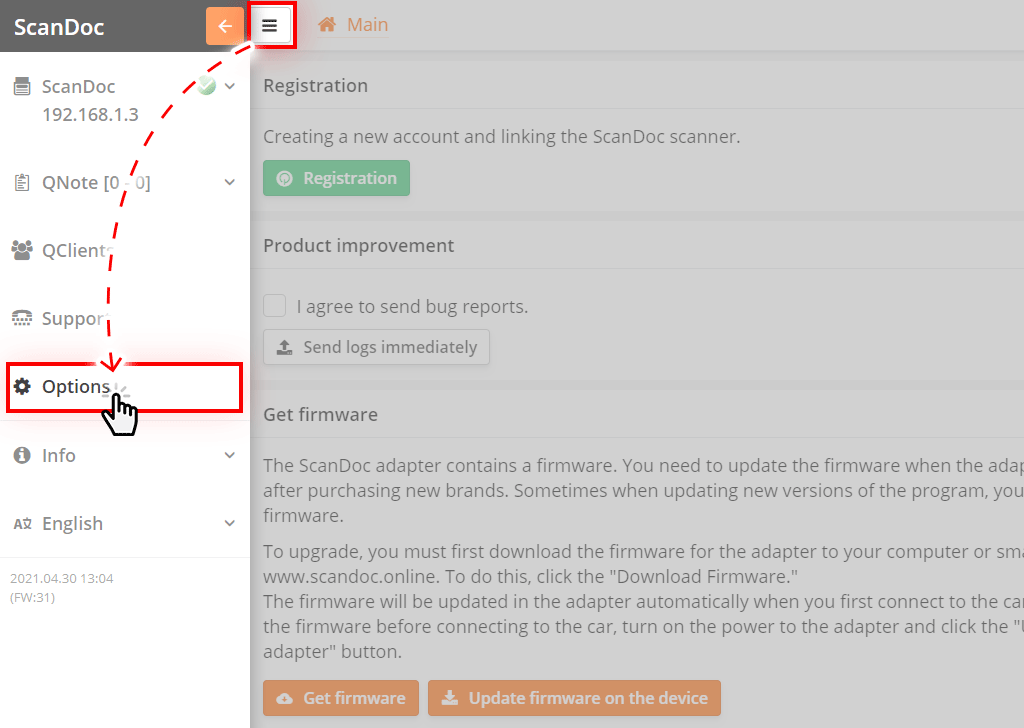
In the program, click the button at the top of the window, an additional side menu will appear.
Click the "Settings" button in the side menu, you will be taken to the program settings window.
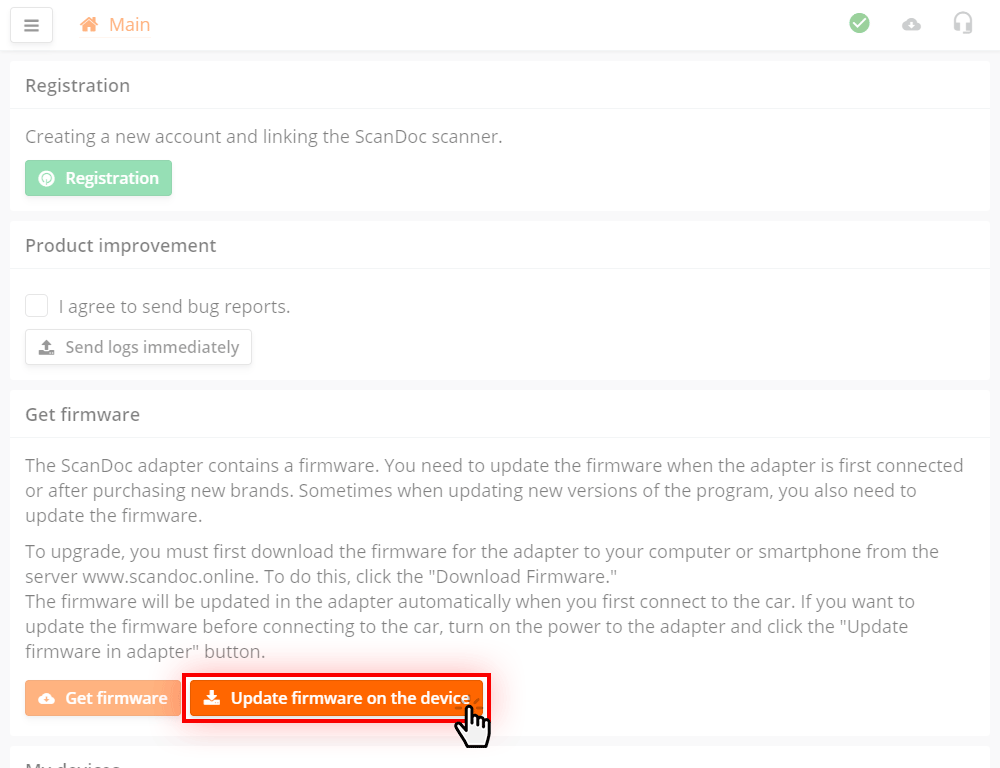
In the options window, click the Update firmware on the interface button
The firmware will be written to the scanner. The device is now ready for use.
If you're not yet familiar with the ScanDoc software, you can read the detailed user manual.
A few important features that are useful to know about when using the interface on a daily basis.
The interface settings (WLAN access point, BLE, sleep mode) are stored in the interface itself. There are two ways to change them:
When powered on (connected to the OBD-II port), the interface is ready to accept connections over all three channels: WLAN, BLE and USB. As soon as the first connection is established, the other two are automatically disabled, and the interface operates only on the selected channel until the power is cut off.
The number of devices that can be paired with the interface over BLE is limited and is defined in its settings. By default, the interface remembers only one device. So even after the power is cycled, other phones and computers will no longer be able to connect to it.
This is intentional. The interface stays plugged into the vehicle's OBD-II port, and the limit prevents unknown devices from pairing with it and connecting to the vehicle while driving.
While no BLE device is paired with the interface, its LED stays on continuously. This is a reminder to pair. After the first pairing the LED goes off.
While a phone is paired with the interface, no other phone or computer can connect over BLE. To unpair the phone:
The Max paired devices parameter in the same section lets you increase the number of remembered devices to 5.
If you work with the interface over BLE, disable its WLAN access point after the first successful pairing. Otherwise, if the power is accidentally interrupted, the interface will bring up the WLAN network again, the phone may automatically connect to it, and the interface will lock onto the WLAN channel. BLE communication will be impossible until the next power cycle.
The interface will reboot and come back online over BLE in about 10 seconds.
When the communication session with the program ends, the interface waits 6 minutes (factory setting) for a new connection and, if none arrives, enters sleep mode to avoid draining the vehicle's battery.
The interface monitors the vehicle's supply voltage and wakes up automatically on the voltage surge when the engine is started or the ignition is switched on. Operation continues on the same communication channel the interface was using when it went to sleep. If the program does not connect within the same time, the interface goes back to sleep.
The interface can be restored to its initial state from the ScanDoc program. The reset restores the factory WLAN and BLE names and passwords, enables the access point, removes all paired BLE devices and returns the sleep mode settings to their defaults.
The reset is performed over USB only. Unlike BLE and WLAN, this channel cannot be disabled in the settings, so it is always available.
After the reset the interface will reboot and will again be available over WLAN, BLE and USB, as on first power-on.