Quantex GmbH
DE RU EN EL
Your region: Europe

Commissioning


Terms and definitions

Adapter Wi-Fi connection password

Adapter Wi-Fi connection password

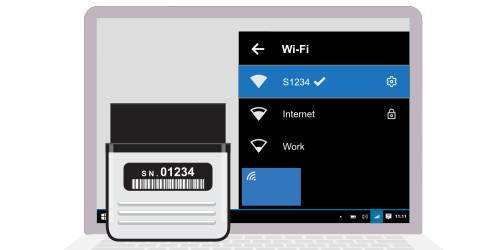
To connect the ScanDoc diagnostic interface to a computer or phone over Wi-Fi, you need to enter the adapter's Wi-Fi password.
The Wi-Fi password is set in the adapter at the factory.

If your scanner has the serial number s/n: 01230, then the Wi-Fi connection will be named S1230, and the password for the Wi-Fi connection to the adapter will be scandoc1230.

Change the password (Network name (SSID)) for the Wi-Fi connection to the scanner

Putting the scanner into boot mode

This is only necessary if you have purchased a new scanner or have been working with the old software and are now switching to the new one.
If you have already been working with the new software, skip this step.
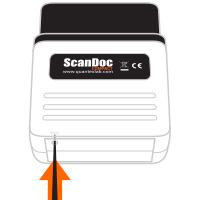
Boot mode (latest-generation ScanDoc Compact in the short housing)

  • Disconnect the device from any power source.
  • On the underside of the device you can see a recessed reset button.
    Press this button with any thin object, such as a paper clip, and hold it down.
  • Apply power to the device (for example, connect it to the diagnostic connector) while still holding the reset button.
  • Release the reset button.
  • The device will be in boot mode (the red LED will glow faintly, at half brightness). After some time (approximately 30 seconds) the device will come online.

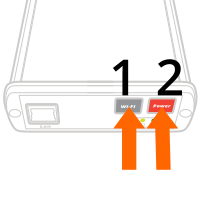
Boot mode (ScanDoc in the metal housing)

  • Turn off the device.
  • Apply power to the device (for example, connect it to the diagnostic connector).
  • While holding the "Wi-Fi" button, press the Power button.
  • The device will be in boot mode (the red LED will glow faintly, at half brightness). After some time (approximately 30 seconds) the device will come online.

If the adapter update did not occur for some reason, you can exit boot mode by turning the device's power off and back on.
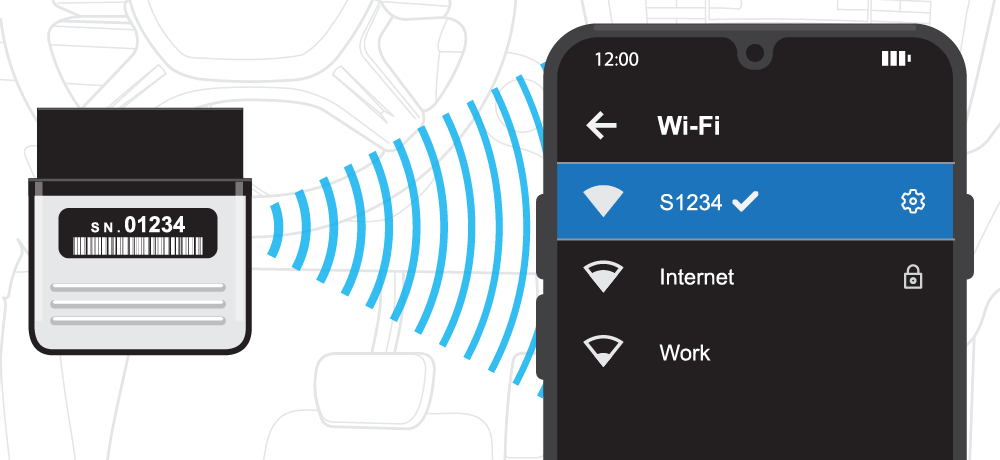
Connect to the ScanDoc adapter
  1. Connect the ScanDoc Compact to the vehicle's OBDII diagnostic connector.
  2. Connect to your adapter's wireless Wi-Fi network using a computer or smartphone.
    If your scanner has the serial number s/n: 01230, then the connection will be named S1230, and the password will be scandoc1230.
  3. Connect to the ScanDoc adapter and wait a moment while the connection is established (about 5 seconds).
    Then press the "OK" button.